App: Zephyr Fan
Demo ↗An autonomous smart fan that tracks people and can be controlled with hand gestures. The system uses computer vision to rotate towards users and interpret gestures for speed and mode control, with a real-time app interface to monitor and override behaviour.
Built with React Native, TypeScript, Expo, Three.js and WebSockets.

Zephyr Fan App in action
The brief
We were prompted with: "Create a robotic system that helps humans."
Sitting in the University of Edinburgh's extremely hot AT_5 rooms, the idea of a smart fan came naturally. The goal was to build something that felt genuinely useful, not just technically interesting.
We quickly converged on a system that could:
- Track and face people automatically using a camera
- Detect hand gestures to control speed and mode
- Run vision models on an onboard Raspberry Pi
- Provide a companion app and website for manual control
- Use WebSockets for real-time, two-way communication
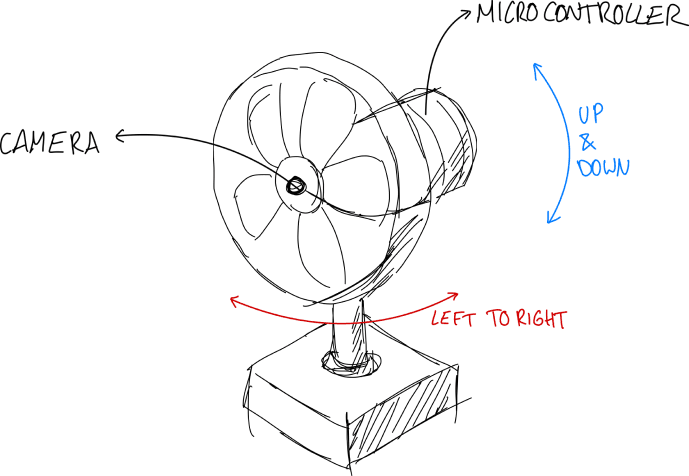
Day 0: Sketch of the fan's capabilities. Direction, power and mode controlled via gestures and app.
Because the system would be demoed live, we also needed:
- Multi-user support (for demo scenarios)
- Admin / view-only modes (to control interactions)
- A dynamically generated QR code for quick access
Looking back, focusing on the demo experience from day one was one of our best decisions. It gave us a clear north star: build something that feels convincing in a live setting. It meant judges could interact with the system instantly from their own devices, rather than watching a passive demo.
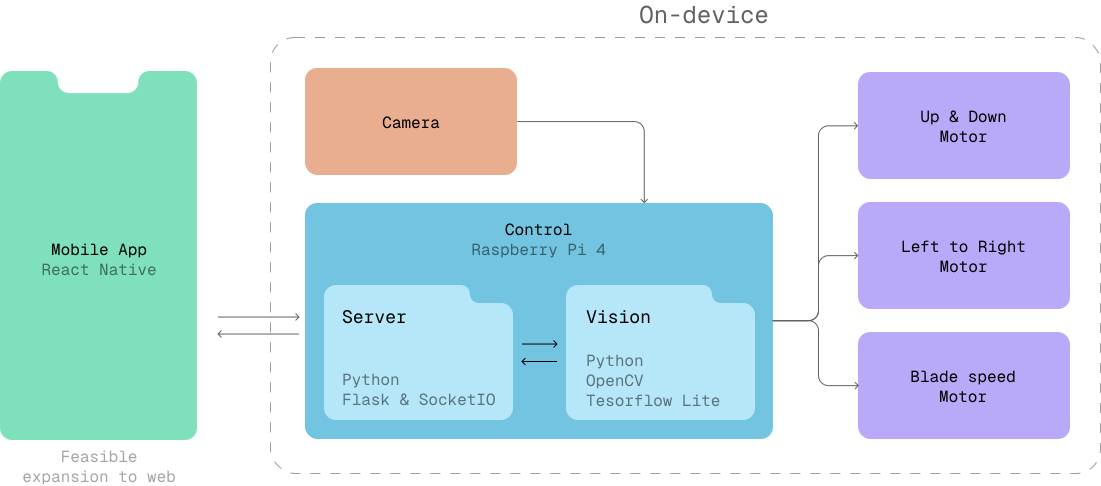
Overview of the system architecture
I focused on:
- Designing and building the app and website
- Implementing the control loop
- Setting up the WebSocket communication layer
As a bonus, I also dipped my toes into 3D modelling and rendering.
Next, I'll cover some of the more interesting parts of the design and development process.
Design
As a challenge, and to aim for a more premium feel, I decided to include a fully interactive 3D model of the fan in the app. This follows a pattern seen in higher-end IoT apps, where the device is represented visually.
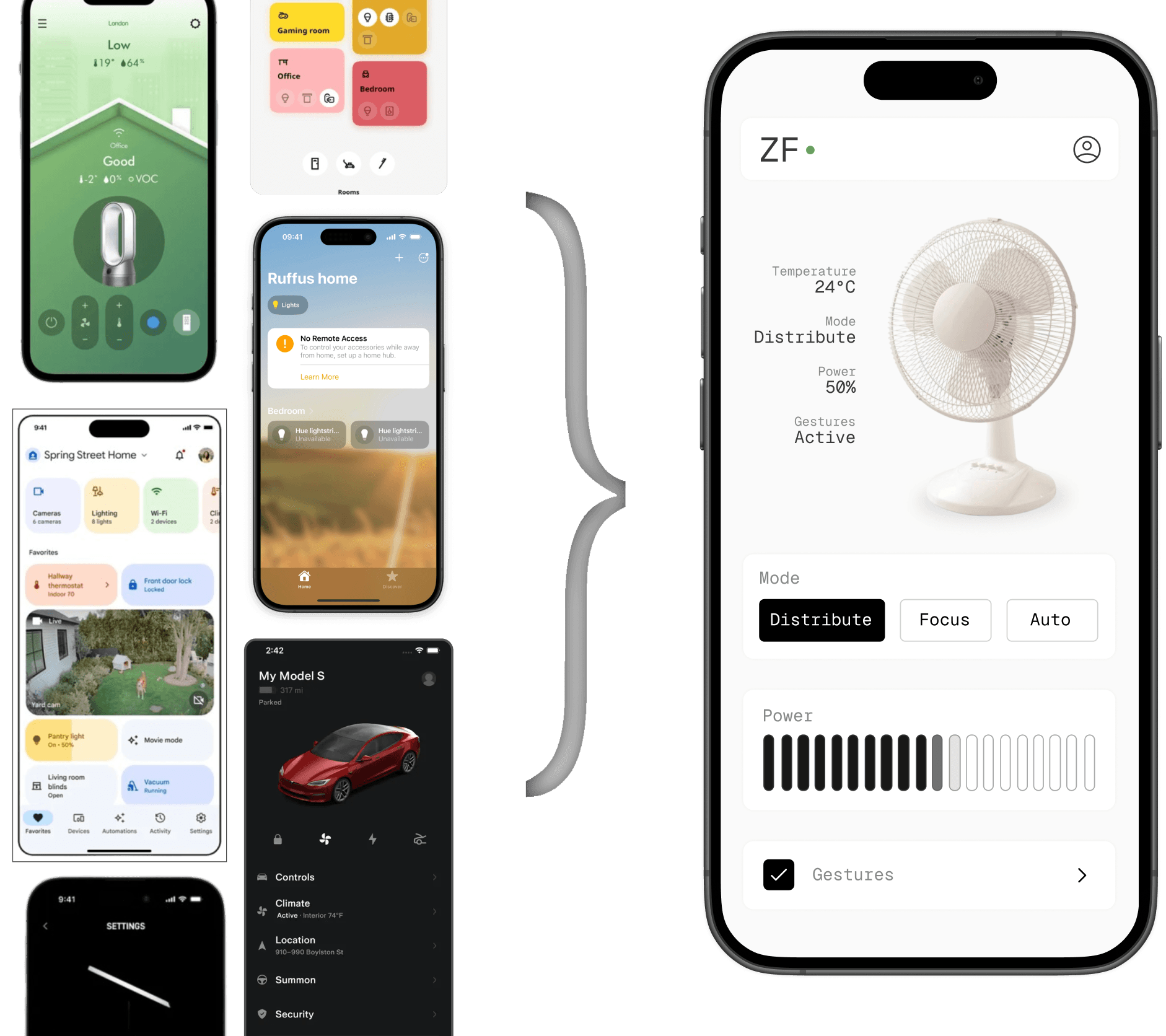
Design inspiration
Committing to a real 3D model, rather than a static render, meant the UI could reflect the system state directly. The goal was for the model to be a 1:1 representation of the physical fan. For example, the speed of the blades visually matches the actual fan speed, and removing the blade cage makes the motion easier to see.
Stripped-down 3D model showing blade speed clearly
I drew inspiration from apps like Amie, Lapse and ID by Amo, where haptics contribute to the personality of the app.
The main interaction where this came through was the power slider. As the user drags the slider, the haptic feedback changes depending on speed, with stronger, more defined feedback at the extremes. It's a small detail, but it made the interaction feel much more physical and responsive.
Development
The control loop was simple in principle: each camera frame was used to detect a person and recognise gestures, which then updated the fan's orientation and behaviour in real time.
In practice, it was heavily constrained by hardware. We ran lightweight TensorFlow Lite models on a Raspberry Pi, eventually upgrading from a Pi 3 to a Pi 5 to keep up. Even then, we had to balance accuracy against responsiveness.
The system worked well at close range, but had clear limits. Person detection remained reliable up to ~14m, while face detection dropped off beyond ~1m. Since gesture recognition depended on face detection, it degraded quickly with distance and poor lighting.
On the hardware side, the fan supported horizontal rotation and vertical tilt. Getting stable movement was harder than expected, requiring motors strong enough to move the head while avoiding slipping or backtracking. We settled on a motor + worm gear setup for tilt, and reduced movement bounds from +/-45° to +/-35° to reduce structural strain.
Although I chose Expo and React Native for their cross-platform capabilities, not everything worked seamlessly across iOS, Android, and Web.
Some Three.js features, particularly around instanced meshes, were not fully supported on iOS. This caused issues when rendering components that relied on model instancing (like the blade cage and fan blades). The pragmatic workaround was to use the usual if (Platform.OS === 'ios') pattern, loading alternative models for iOS where needed. Not ideal, but it worked.
Demo
The demo experience ended up being one of the strongest parts of the project. Instead of watching a presentation, judges could scan a QR code and interact with the system directly from their own devices.
One interesting observation was around expectations. Some users expected the fan to react instantly, but the inertia of the fan blade system and the tracking latency made the behaviour feel slightly slower than judges anticipated.
Reflections
The hardest part of the project was not the app or even the ML, but the hardware.
The fan head was quite heavy, and we initially did not account properly for balance. We ended up having to add counterweights at the last minute, along with a fair amount of rushed 3D printing to make everything hold together. It worked, but it definitely did not look as polished as we would have liked.
The biggest lesson for me was how unforgiving hardware can be. Coming from a software background, I initially assumed the hardware side would be relatively plug-and-play. In reality, it required thinking about weight distribution, stability, and physical constraints much earlier in the process.
Obsessively,
Tomas